
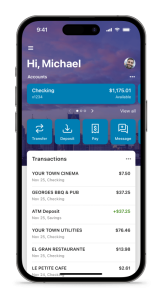
To make a mobile deposit to your PDCU account using your smartphone, log into your MyPDCU app or the MyPDCU online banking portal and click on “Deposit.” Enter the check amount, click “Continue,” and select which of your accounts (if you have more than one) you want to make the deposit to. Sign your check, write “For Mobile Deposit Only at PDCU”, and include your PDCU account number. Follow the instructions provided in the app to capture an image of the front and back of the check.
Anything deposited over $2,500 will be reviewed by the credit union and will not show in your account right away. Check limit is $25,000. All deposits are subject to holds.
Securely store the original check for 7 business days after the deposit. Verify you check has been credited to your account. After 7 business days, destroy the original check by marking it “VOID” and shredding it.
5 Helpful Hints for Mobile Deposits
- Always write “For Mobile Deposit Only at PDCU” and your account number clearly on the back.
- Take photos in good lighting on a dark background for the clearest images.
- Deposit before 5:00 p.m. on business days for faster availability.
- Check your account balance in the app after 24–48 hours to confirm the funds posted.
- Contact us at 844-700-7328 if your deposit is over $2,500 or if you have any questions.
Making a mobile deposit at People Driven Credit Union is simple, secure, and available 24/7 through the MyPDCU app. You can deposit checks from anywhere without visiting a branch. Many members use this feature weekly and love how quickly funds become available. Always follow the 7-day storage rule and shred the original check once the deposit clears. This keeps your money protected while giving you the convenience you expect from your credit union. Thank you for banking with us. Our team is always ready to help you with mobile deposits or any other account questions.


