PDCU Membership Pays with CashBack+
Earn Cashback on Your Everyday Purchases!
People Driven Credit Union members, meet Cash Back Plus : a more innovative, easier, and more rewarding way to shop. It’s cashback made simple, personalized to you, with no gimmicks or complicated points just real money back.
How to Use CashBack+: A Step-by-Step Guide to Earning and Redeeming Rewards
Ready to get more out of every purchase? Learn how to activate CashBack, earn rewards on everyday spending,
and redeem those rewards with confidence using our simple step-by-step guide.
PDCU Membership Pays with CashBack+
Earn Cashback on Your Everyday Purchases!
People Driven Credit Union members, meet Cash Back Plus : a more innovative, easier, and more rewarding way to shop. It’s cashback made simple, personalized to you, with no gimmicks or complicated points just real money back.
How to Use CashBack+: A Step-by-Step Guide to Earning and Redeeming Rewards
Ready to get more out of every purchase? Learn how to activate CashBack, earn rewards on everyday spending,
and redeem those rewards with confidence using our simple step-by-step guide.
Three ways to earn cash back
1. Buy digital gift cards through Offers
Open CashBack+ through online banking or the MyPDCU mobile app and select “Offers.” Browse participating brands, choose a digital gift card amount and review how much cash back you can earn before confirming your purchase.
The digital gift card is purchased using funds from an eligible PDCU checking or savings account. Your gift card is then sent to the email address on file with PDCU and stored in your CashBack+ Wallet. You can use it immediately or save it for later.
Participating brands, cash-back amounts, purchase minimums and gift card terms can vary. Review the offer details and confirm that the merchant accepts the digital gift card for your planned purchase before completing the transaction.
2. Shop with CashBack+ Pay
CashBack+ Pay is a separate mobile app and desktop browser extension powered by Prizeout. It gives you another way to earn cash back when shopping with participating brands.
Choose a participating brand and enter the amount of your eligible purchase. CashBack+ Pay creates a digital gift card or barcode that you use at checkout. The purchase is funded from your connected PDCU account, and cash back from a completed, eligible purchase is added immediately to your CashBack+ balance.
CashBack+ Pay can be used for eligible in-store and online purchases. Available brands, cash-back amounts, minimum purchase requirements and redemption methods may vary.
3. Complete activated Actions
Actions allow you to earn cash back by completing eligible activities offered by People Driven Credit Union. Available Actions can change and may have different requirements or expiration dates.
You must activate an available Action before CashBack+ begins monitoring whether its requirements have been completed. Select “View Details” to review the requirements and terms before activating an Action. Cash back is added after CashBack+ confirms that the activated Action has been completed.
How to redeem your cash back
Open CashBack+ and select “Redeem.” Choose one of the eligible PDCU checking or savings accounts displayed, then transfer your available cash-back balance.
There is no minimum redemption amount. Transfers to eligible PDCU accounts are completed immediately.
Find and manage your digital gift cards
Digital gift cards purchased through CashBack+ are sent to the email address on file with People Driven Credit Union. They are also stored in your CashBack+ Wallet.
- Open CashBack+ through online banking or the MyPDCU mobile app.
- Select the menu.
- Select “Wallet.”
- Choose the digital gift card you want to use.
- Follow the displayed instructions to use the card online or in a participating store.
A used gift card may remain visible in your Wallet. You can archive it to remove it from the main Wallet view. Archived gift cards remain available in your history and can be restored later.
For screenshots and complete instructions, read the CashBack+ step-by-step guide.
Download CashBack+ Pay
CashBack+ Pay is available for iPhone and Android. Beginning September 15th, the Cashback + Chrome browser extension will be removed from the Chrome store and no new downloads will be allowed. The extension will be fully deprecated effective December 1, 2026.
- Download CashBack+ Pay for iPhone
- Download CashBack+ Pay for Android
- Get the CashBack+ Pay desktop browser extension
After downloading CashBack+ Pay, follow the prompts to select People Driven Credit Union and securely connect your PDCU account.
CashBack+ and your information
CashBack+ and CashBack+ Pay are powered by Prizeout. When you access the service, download the app or install the browser extension, Prizeout’s terms and privacy practices apply.
The optional browser extension may use browsing information to identify participating merchant websites and eligible offers. Review the Prizeout Privacy Policy and Prizeout Terms of Use before using CashBack+ Pay.
Frequently asked questions
How to get started with Cashback+
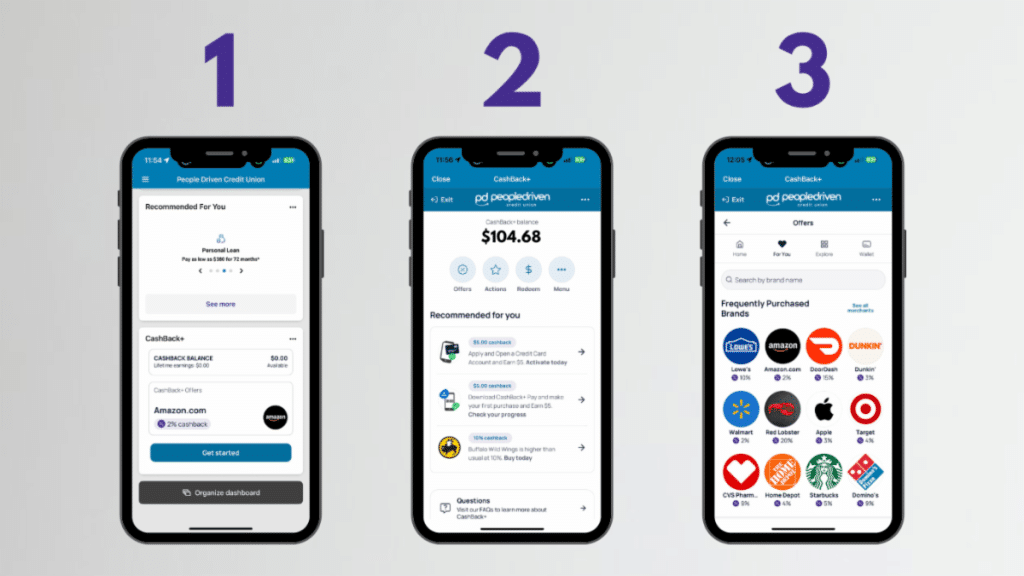
- Open Your MyPDCU Mobile App Open your MyPDCU Mile App, and locate the CashBack+ widget on your dashboard. Click Get Started.
- Choose the "Offers" Button From the four buttons below your balance, select "Offers."
- Explore the Offers! Spend some time checking out all of the available offers for your favorite places to shop and eat!
Choosing Offers
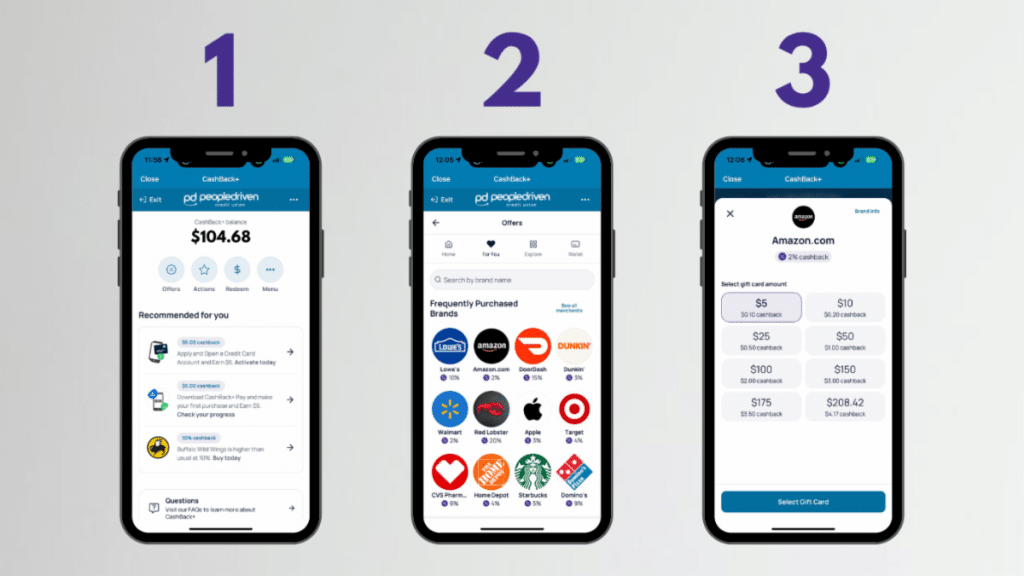
- Navigate to your CashBack+ Widget Once inside the portal, click Offers.
- Select Your Retail Brand of Choice Scroll or search for the retail brand you want to purchase with to see what the brand's current cash-back offer is at the time.
- Purchase the Gift Card to Make a Purchase You will purchase a gift card to cover the amount of the purchase you are attempting to make. This gift card has been purchased and stored in your CashBack+ Wallet. You can choose to use this immediately or store it in your wallet for later use.
Using CashBack+ Wallet
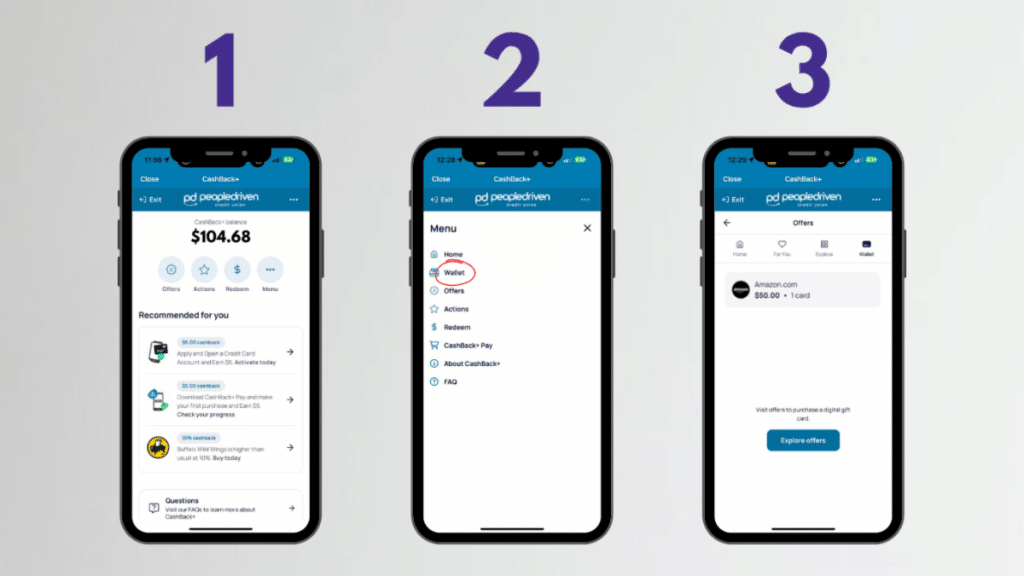
- Navigate to your CashBack+ Widget Once inside the portal, click More.
- An Action Menu Will Appear From the menu, select Wallet.
- Select the Gift Card You Wish to Use To use the card, click on the Gift Card you want to use from your wallet. Select Shop Now. This will direct you to the company website. Alternatively, you can use the gift card code by copying and pasting it at checkout online.
- Offers are proactive purchases of digital gift cards you plan to use later.
- Pay allows you to earn cashback on purchases you're already making through the convenient CashBack+ Pay app.
Disclosures
Who can use CashBack+?
CashBack+ is available to eligible People Driven Credit Union members with access to PDCU online or mobile banking and an eligible PDCU account.
Not a member? Learn about PDCU membership eligibility.
Need help with CashBack+?
If you have trouble accessing CashBack+, connecting your PDCU account, locating a purchased digital gift card or redeeming cash back, contact People Driven Credit Union.
For detailed instructions and screenshots, visit the CashBack+ step-by-step guide.
You may also be interested in...
Digital Banking Tools
Digital Banking Tools from People Driven Credit Union make it easier to manage your money, move funds, pay...Read More

Check Your Debt-to-Income Ratio in Seconds
If you’ve ever wondered, “Am I carrying too much monthly debt?” you’re not alone—and now you’ll...Read More
Introducing PDCUpay Powered by Payrailz
PDCUpay Powered by Payrailz enables you to securely send and receive money, pay bills, and transfer funds...Read More
How to Use CashBack+
A Step-by-Step Guide to Earning and Redeeming Rewards Whether you're shopping online, picking up...Read More